
What is SkuHQ? Product Information Management for B2B wholesale and distribution
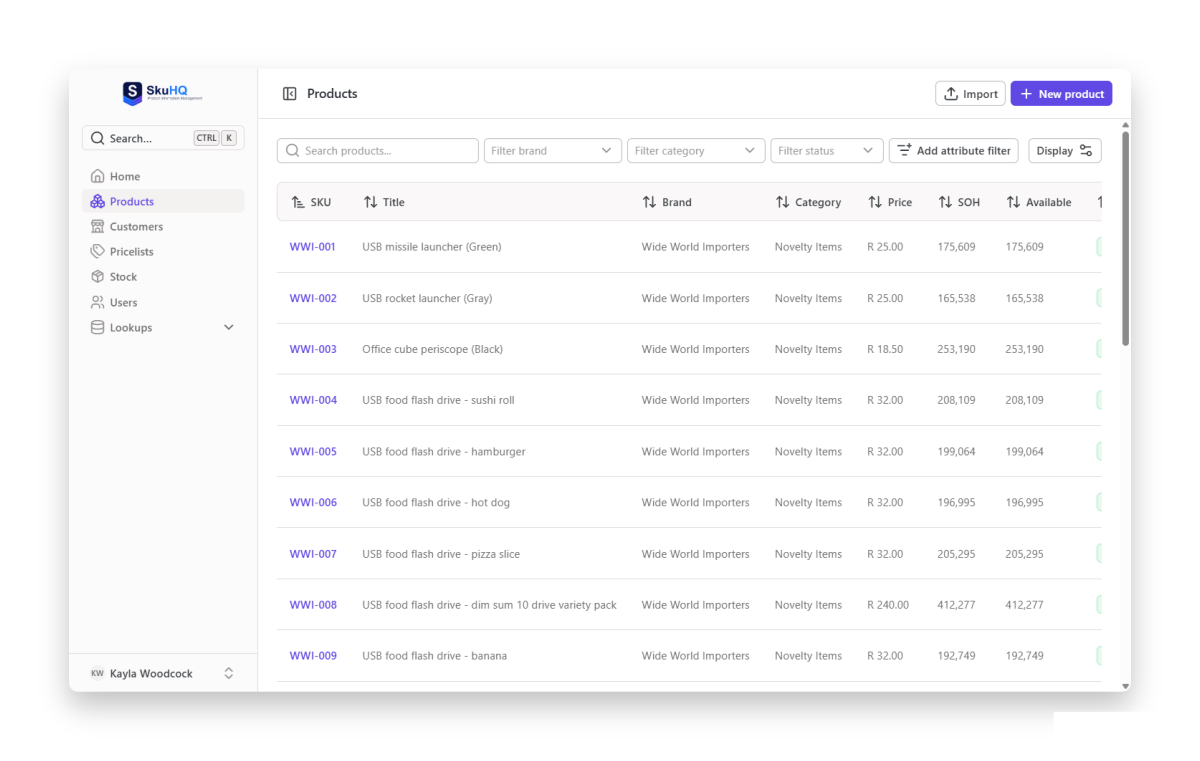
If you sell to resellers, chances are your product data lives in spreadsheets: one file for the full catalog, another for each customer’s prices, a stock list that was accurate this morning. SkuHQ is product information management for B2B wholesale and distribution. It centralizes your entire catalog (SKUs, barcodes, brands, pricelists and live stock) in one portal, then serves it to your customers and resellers over a clean, well-documented API. No more scattered spreadsheets.
This post is the plain-English tour: what SkuHQ does, how the pieces fit together, and who it is for.
Who SkuHQ is for
Teams that sell the same products at different prices to different buyers:
- Wholesalers and distributors whose catalog, price lists and stock counts live in spreadsheets that get emailed around.
- Importers and suppliers who quote each customer their own price, and can’t let one buyer’s price leak to another.
- Anyone with both kinds of resellers: the ones who want an API key, and the ones who just want a link they can open in a browser.
If that’s you, read on.
The problem: spreadsheets don’t scale
Wholesale catalog data has three failure modes, and email causes all of them. A price list sent in January is stale in February. Stock counts in a spreadsheet are fiction the moment someone ships an order. And every reseller works from a different file, so nobody can say which version is the truth.
SkuHQ replaces the files with one catalog. You manage it once, in the portal, and your customers always read live data from the same place: through the API if they have an integration, or through a browser link if they don’t.
One catalog, every detail
Every SKU in SkuHQ carries what wholesale buyers actually ask for: barcode, brand, category, colours, custom attributes, measurements, images (uploaded or linked by URL) and collections for grouping products your way.
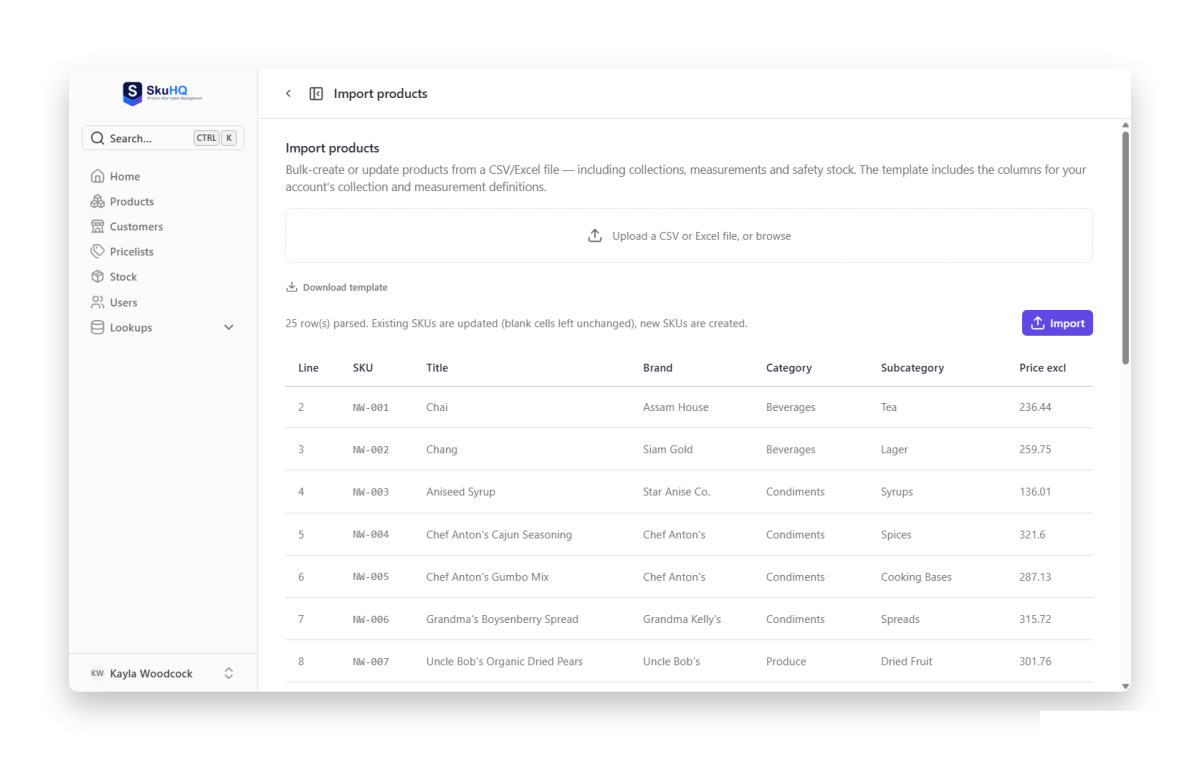
Getting your data in is a bulk job, not a typing job. You import from CSV or Excel using ready-made templates with exact validation and per-row error reporting, so nothing half-imports: if row 407 has a bad barcode, you fix row 407, and everything else loads.
Your prices, your rules: customers and pricelists
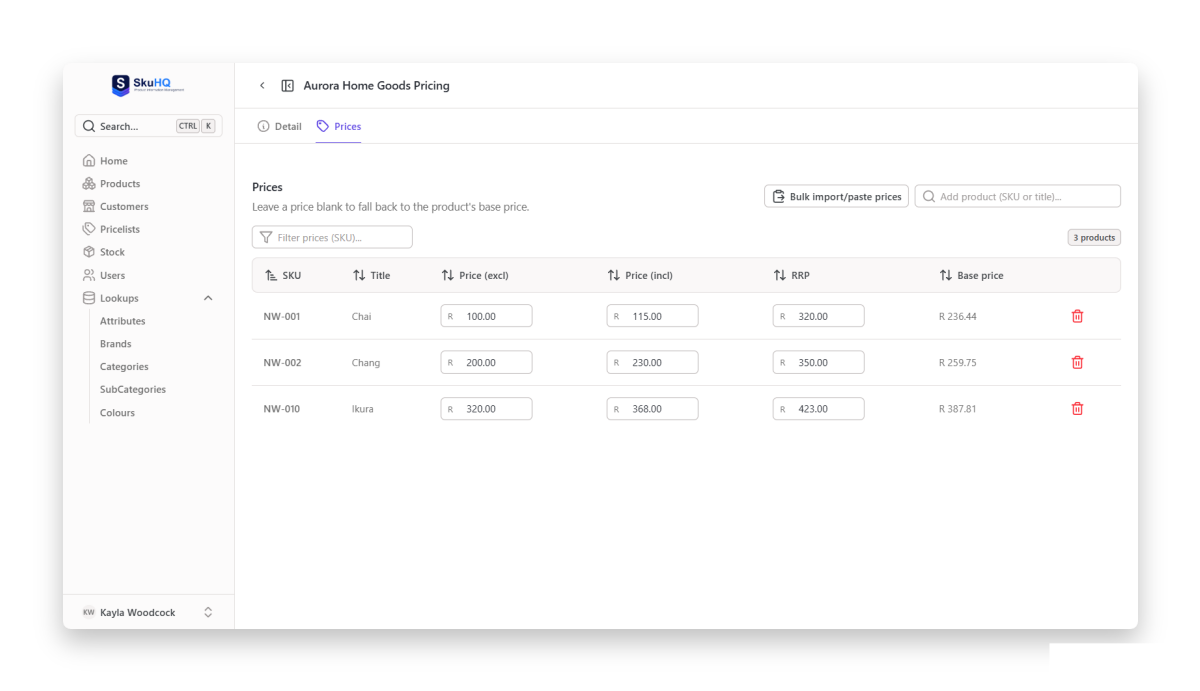
Wholesale pricing is never one price. SkuHQ gives you unlimited pricelists with per-customer prices and product exclusions. Attach a pricelist to a customer and that customer sees only their own prices and their own range, in the API and on their catalog link alike. Other customers’ prices never leak into theirs.
Live stock across your warehouses
Stock lives in SkuHQ too, not just in your accounting export. You get multi-warehouse stock levels with safety stock, safety-stock-aware availability, and template-based import and export that reports on every row. Feed it with the tool of your choice (more on SkuFeed below) and your resellers always read today’s quantities, not last Tuesday’s.
Built for distribution, not a generic PIM
Distribution is the part most PIMs tack on last; it is the reason SkuHQ exists.
Stop emailing spreadsheets: the reseller API
A REST API serves your products, pricing and stock to your customers and integration partners, secured with per-customer API keys and rate limits. Prices resolve through each customer’s pricelist per request, so one endpoint serves every customer. Each key has its own usage dashboard, and the API is documented at api.skuhq.co. From Growth up, the API also runs on your own domain, like api.yourcompany.com, so the integration carries your brand, not ours.
No programmer? No problem: live catalog links
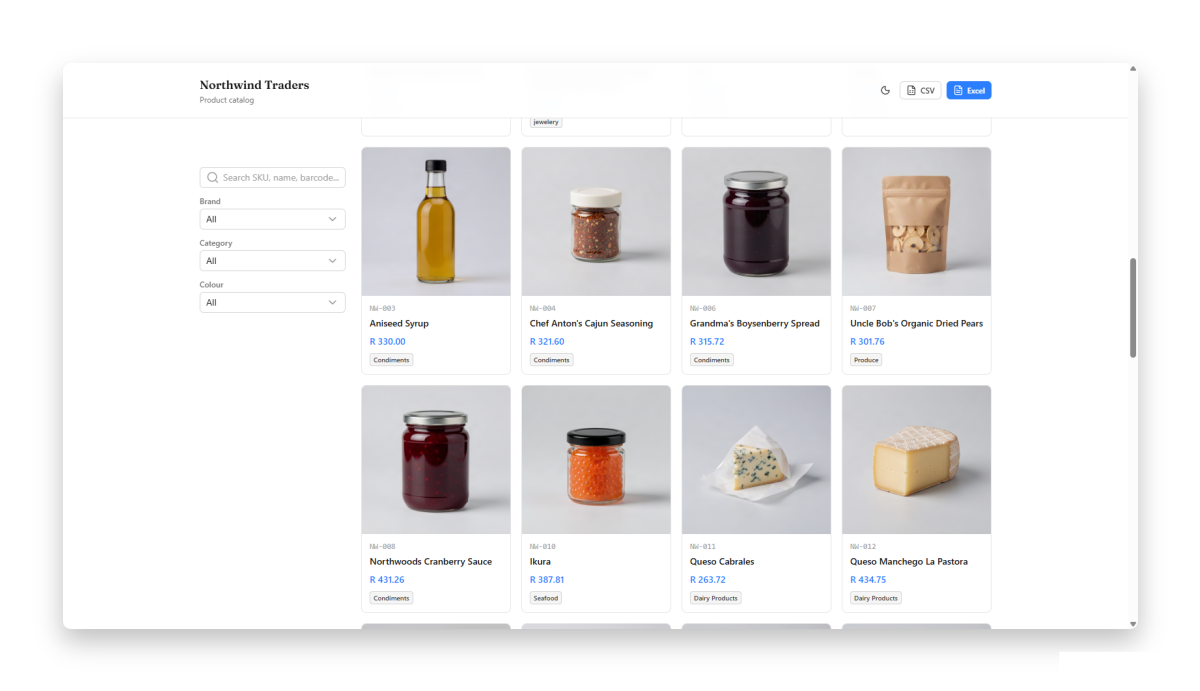
Some resellers won’t touch an API, and that is fine. Send them a private catalog link instead: your live catalog opens in any browser, with optional login and nothing to install. Each customer sees only their own prices and range; they can search, filter and download to CSV or Excel. You can revoke a link from the portal at any time, so there is never a stale PDF floating around. On the Growth and Scale plans the catalog runs on your own domain, like products.yourcompany.com.
Keep it fresh on autopilot with SkuFeed
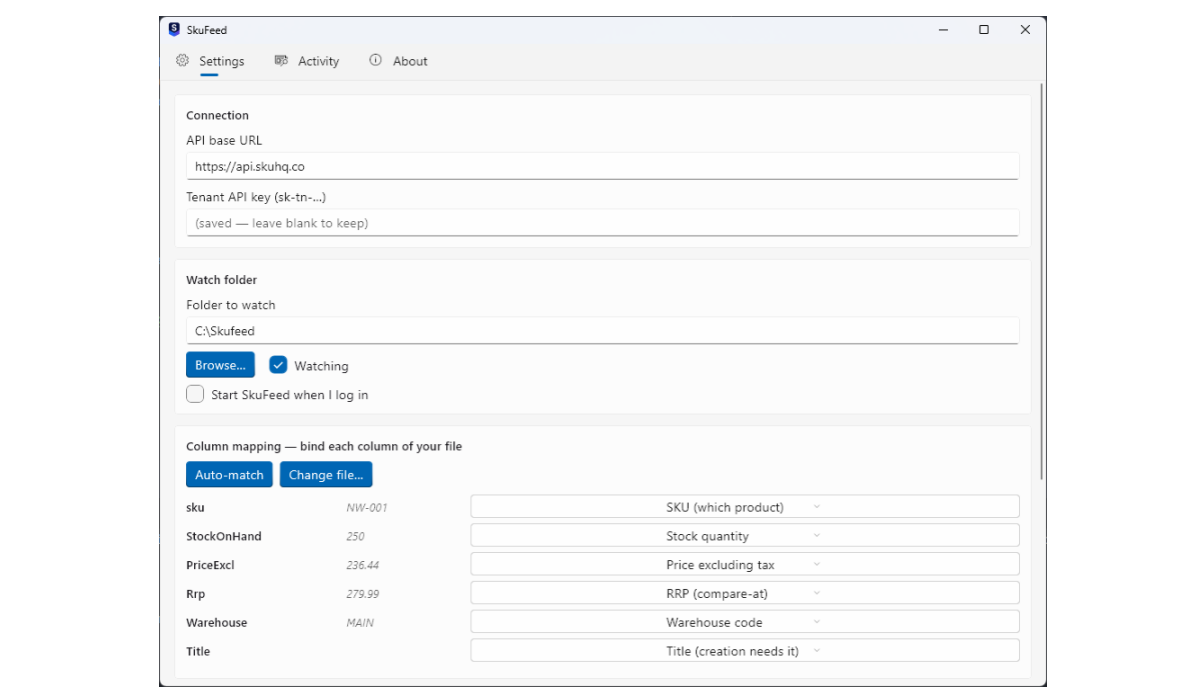
Stock and prices still change in your accounting or warehouse system. SkuFeed is the free desktop app that bridges the gap: point it at a folder where your system already drops CSV or Excel exports, and it keeps SkuHQ current all day, on Windows and macOS. It matches by SKU, so it updates the products you have and can create new ones from the feed; it never guesses. Blank cells leave fields untouched, and a half-written export cannot zero your stock. Every run lands in a history with per-row results: created, updated, skipped or rejected, with the reason. Read the collections guide to see one of the details it carries.
SkuFeed is included free with every plan.
The benefits, in one place
- One source of truth. Products, prices and stock live in one portal, not in a folder of emailed files.
- Prices per customer. Unlimited pricelists and product exclusions; every customer sees only their own prices.
- Live stock, always. Multi-warehouse levels with safety stock, updated continuously, read live by resellers.
- Resellers integrate themselves. Per-customer API keys with pricelist-resolved prices and rate limits; no more resending files.
- Non-technical customers included. A private browser catalog link with their prices, search, filters and CSV/Excel download.
- No code on your side either. Bulk CSV/Excel import into the catalog and SkuFeed to keep stock and prices current.
- Your data stays accurate. Per-row validation on import, SKU-matched feeds, blank cells that never destroy data.
Want to see this on your own catalog? Start your free trial.
Questions wholesalers ask
Does SkuHQ replace my spreadsheets?
The emailed files, yes. Import your catalog from CSV or Excel, keep prices and stock in the portal, and let SkuFeed update stock and prices from the exports your system already writes. Your resellers read live data through the API or their catalog link instead of opening attachments.
Can my resellers use it without a developer?
Yes. Send them a private catalog link: their own prices and range in any browser, with search, filters and CSV or Excel download. The API is there for the resellers who do have integrations.
How do per-customer prices stay private?
Each customer is attached to their own pricelist and sees only their own prices, in the API and on their catalog link alike. One customer’s prices never appear in another’s.
What is SkuFeed?
A free desktop app (Windows and macOS) that watches a folder your accounting or warehouse system already writes CSV or Excel exports to, matches the rows by SKU and keeps SkuHQ current. It is included with every plan.
How do I get my existing catalog in?
Bulk import from CSV or Excel with ready-made templates. SkuHQ validates every row first, so a bad barcode in row 407 is fixed in row 407 while everything else loads. For big catalogs, the Scale plan comes with priority support, and we help you get it in.
Is there a free trial?
Every plan starts with a 14-day free trial. No setup fee, cancel anytime.
Plans and pricing
SkuHQ comes in three plans, and every one includes SkuFeed for free:
- Starter, $89/month: 500 SKUs, 5 reseller API keys, 10 k API calls a month, 50 customers, 5 users, 10 GB images.
- Growth, $279/month (most popular): 3 000 SKUs, 50 API keys, 100 k calls a month, 250 customers, 10 users, plus custom API and catalog domains for your brand.
- Scale, $429/month: unlimited SKUs, keys, calls and customers, 25 users, custom domains and Priority support + 99.9% SLA.
Every plan starts with a 14-day free trial. No setup fee, cancel anytime.
Start a 14-day free trial: no card needed, no setup fee, and see what one catalog can do.